software · written at front of house
If the right tool does not exist, we build it.
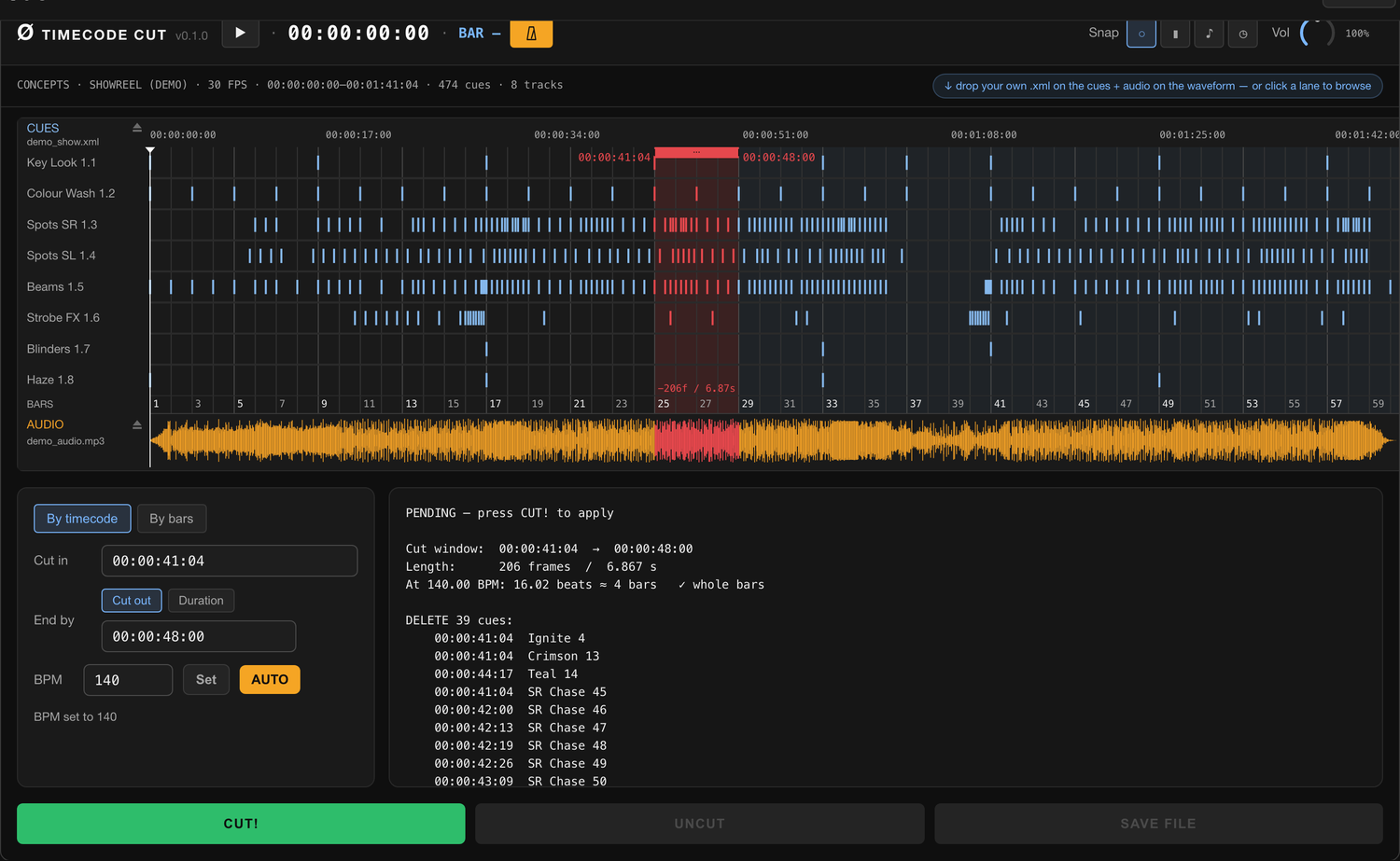
These are the tools we needed and could not find — so we built them. First: MA2 Timecode Cut. Ripple-cut a grandMA2 timecode show to match an audio edit, byte-for-byte intact, entirely in the browser. The show file never leaves your machine.
about
Made by operators, for operators.
Cut a section from a track and the timecode show has to collapse with it — drop the cues inside the removed window, slide everything after it left by the exact length of the cut. MA2 Timecode Cut runs that ripple across every subtrack at once and hands back a file grandMA2 re-imports without a fight.
Byte-exact
BOM, namespace, tabs, line endings — everything but the cut stays untouched. The import never chokes.
Bars, not seconds
Cut whole bars at the track BPM, or frame-accurate by timecode. A live preview names every cue that moves.
Stays on your machine
Everything runs in the browser. Nothing is uploaded — no server sees your show.
Also on the desktop
Native build too — macOS and Windows. Get it on GitHub →
guide
Getting the file in and out of grandMA2
Export from grandMA2
The tool operates on the XML that grandMA2 exports from a Timecode pool object. Command line — one line, unambiguous:
Export Timecode 14 "tc_show"
- 14 — the number of the Timecode pool object to export.
- "tc_show" — output filename, without extension (MA appends
.xml).
grandMA2 writes the file into the gma2/importexport folder on the
currently selected drive (internal, USB, or the onPC data folder). Copy
tc_show.xml from there to the machine where you run this tool — USB
stick, network share, or directly from the onPC folder.
GUI alternative: in the Timecode pool you can also export via the object’s edit/menu, but the command line above is a single unambiguous line.
Import back into grandMA2
Import syntax puts the filename first (that’s the “NAME”), destination after; the
.xml extension is not written (MA adds it):
Import "SHOW_cut" At Timecode 40
Import Timecode 40 "…" gives Error #12: EXPECTED NAME
— the argument order is the reverse of Export.
Import into an empty slot, keep the original as a backup, and check the length.
work with us
We are open to complex briefs — and we close them.
Stages, environments, real-time systems — or the missing tool no one sells. If it has to run under pressure and hold, tell us what it needs to do.
hello@oje.studio